your AI work mate
The admin that eats your week. Handed off.
Set up your own AI assistant for your inbox, your trackers and the daily paperwork. Same kit the rest of the team runs. About 40 minutes start to finish, and you never type a line of code.
- Get a Claude Pro subscription.
- Install Claude Code. A few lines pasted into a terminal, about ten minutes.
- Grab the pack, unzip to
Documents\TI, open it in Claude Code. - Hit a wall, or want your reporting key? Mail Andre, or just reply to him.
Get going
The two things you do once, by hand. Everything after is just talking to it.
Documents\TI, open it in Claude Code, say "follow 00 START HERE".
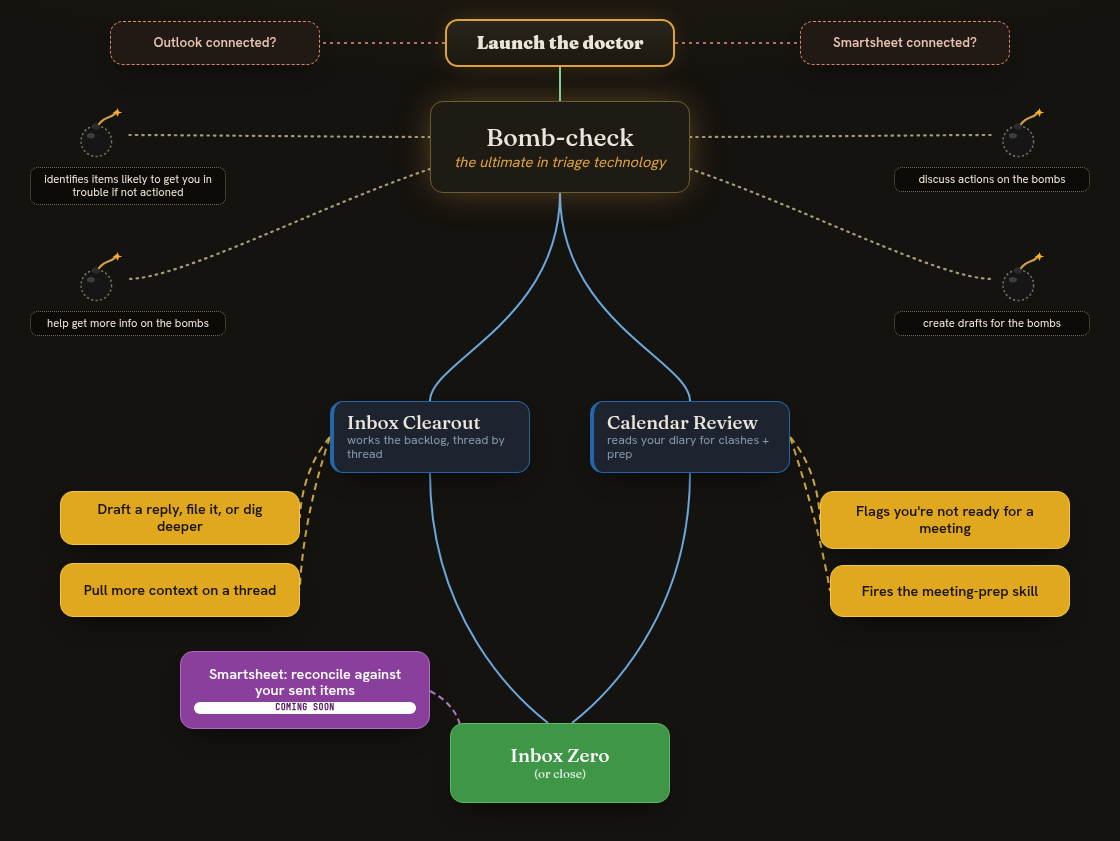
What is Inbox Doctor implementing?
The whole flow of a doctoring sitting — what's live now, and what's coming. Tap it for the full version.
Out of the box
Works the minute it's installed, on your own mailbox. Nothing else to set up. Real jobs, the actual prompts. Steal any of them.
Add-ons
Optional extras you switch on when you actually need them. Trackers, web portals, a second brain.
Good to know
A couple of things worth reading before you're in deep.
More
How to get the best out of it, and what's coming.
For your assistant
Once set up, your assistant can post a snag straight to Andre: a
POST /report with your personal key in the X-Assist-Key
header. It never sends tokens, passwords or mail content, and it always shows
you the report first. Reading updates here is grand; applying them is always
your call, never automatic. And if you're properly stuck before it's even
running, just email Andre at task@stationarystore.ie or reply to him.